
WhatsApp: Get GTM Setup
GTM β€’ Tags β€’ Triggers β€’ Variables β€’ GA4 β€’ Conversion Tracking

Google Tag Manager Setup That Keeps Your Tracking Clean and Scalable

If your website tracking depends on manual code edits every time you need a new event or conversion, things get messy fast. We set up Google Tag Manager properly so tags, triggers, variables, and measurement stay organized. This also works smoothly with GA4 Tracking Setup for better analytics and cleaner conversion reporting.

Best for: lead generation websites β€’ landing pages β€’ service businesses β€’ SEO campaigns β€’ Meta Ads β€’ Google Ads β€’ eCommerce
Tags β†’ Events Triggers β†’ Actions GTM β†’ Control
GTM Flow Snapshot
Website β†’ GTM β†’ GA4
Website Actions GTM GA4
Tracking Control
Structured setup improves scale
Fastest start: send your website URL + current tracking tools on WhatsApp. We’ll suggest the right GTM setup approach.
Updated: March 2026
Built for 2026: clean tag architecture, GTM scalability, GA4 integration, and conversion-focused measurement.
TABLE OF CONTENT

What You’ll Find On This Page

GOOGLE TAG MANAGER SETUP

What Is Google Tag Manager Setup?

Organized tag management for better tracking control

GTM helps manage tracking without repeated code edits

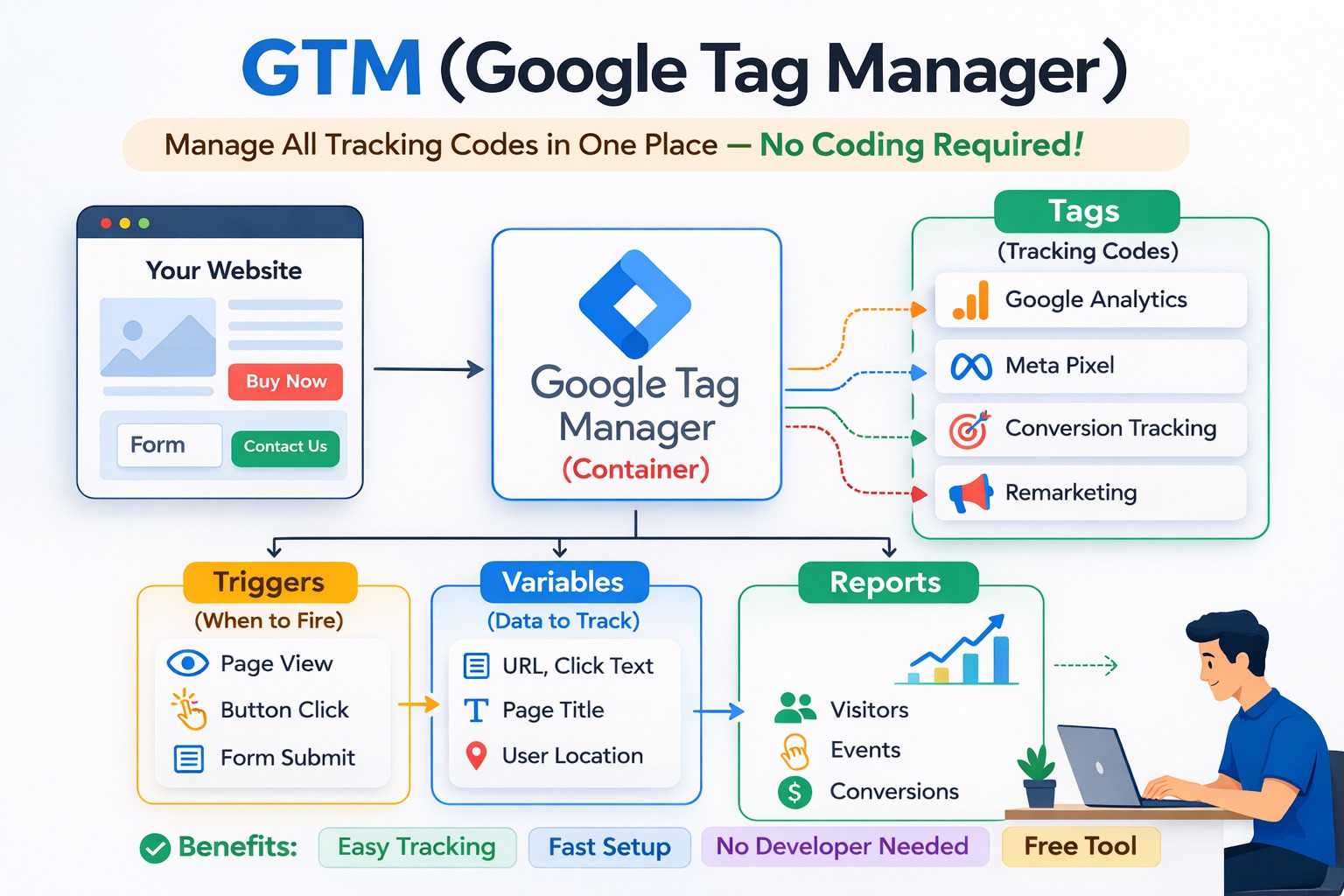
Google Tag Manager is used to manage tags, triggers, and variables from one place so tracking changes do not always require direct code edits on the website. It is especially useful when a website needs structured measurement for forms, clicks, campaign actions, and analytics tools. It becomes even more useful when combined with GA4 Tracking Setup because both tools work well together for cleaner measurement.


  • Tags define what should fire
  • Triggers define when it should fire
  • Variables provide the data used by tags and triggers
  • Containers organize the tracking setup
  • Testing helps validate whether the implementation is working correctly

Get a Quick GTM Review
Google Tag Manager Setup Services
A good GTM setup is not about adding more tags. It is about keeping tracking clean, reliable, and easier to scale as your website grows.
WhatsApp-first GTM brief
Share your website URL + what you want to track. We’ll suggest the best GTM structure.
Prefer call? 8750347699
Official references: GTM β†— β€’ GA4 β†— β€’ Looker Studio β†—
WHY GTM MATTERS

Why Proper Tag Management Matters

Messy tracking creates messy reporting

A website may have analytics, ad tags, remarketing tags, button tracking, form tracking, and platform scripts running at the same time. Without proper structure, managing these becomes difficult. A clean Google Tag Manager setup helps organize that measurement layer and makes updates more efficient. This becomes even stronger when paired with GA4 Tracking Setup.

Tag Management Trigger Logic GA4 Integration Form Tracking WhatsApp Click Tracking Call Tracking Button Click Tracking Scalable Structure

What usually goes wrong
  • Too many scattered tags and scripts
  • No clear naming or container structure
  • Important actions not tracked consistently
  • Events added without testing or debugging
  • Analytics and ad platforms not aligned properly
What a proper setup improves
  • More control over website tracking
  • Cleaner event and conversion setup
  • Better collaboration between website and marketing teams
  • Smoother integration with analytics and ad tools
  • Easier future tracking changes and expansion
WHAT’S INCLUDED

What You Get With Our Google Tag Manager Setup Services

Structure, control, and cleaner measurement
Container & Base Setup
We set up the GTM container correctly so tracking starts with a cleaner foundation.
Tags, Triggers & Variables
We configure the logic needed to measure actions such as clicks, forms, and other meaningful interactions.
GA4 Integration Support
We can integrate GTM with GA4 Tracking Setup so analytics measurement stays organized and easier to scale.
Need analytics and tag management together?
Combine GTM with GA4 Tracking Setup and Landing Page Design for stronger measurement and better lead visibility.
BUSINESS BENEFITS

How Proper GTM Setup Helps Your Website and Marketing

Better structure supports better execution
Cleaner tracking management
GTM reduces the dependency on repeated code changes and makes tracking more organized.
Better support for analytics
A proper GTM setup supports analytics tools like GA4 Tracking Setup more effectively by keeping events structured.
More scalable marketing measurement
As your pages, funnels, and campaigns grow, GTM gives you a more manageable way to expand tracking.
PROCESS & TIMELINE

How We Implement Google Tag Manager Setup

Review β†’ structure β†’ configure β†’ test β†’ refine
Step 1: Website & Tracking Review
Open
We review the website, current scripts, analytics tools, and important user actions that need measurement.
Step 2: Tracking Structure Planning
Open
We decide how tags, triggers, variables, and naming should be organized inside the GTM container.
Step 3: GTM Container Setup
Open
We install and configure the container properly so future tracking becomes easier to manage.
Step 4: GA4 and Event Integration
Open
We can connect GTM with GA4 and configure events for forms, WhatsApp clicks, buttons, calls, and other actions.
Step 5: Testing & Debugging
Open
We test whether tags are firing correctly and whether the expected actions are being captured properly.
Step 6: Improvement Direction
Open
We suggest next steps for campaigns, landing pages, and conversions so the setup stays useful over time.
PRICING OVERVIEW

Google Tag Manager Setup Pricing

Depends on tags, events, platforms, and tracking depth
For small business websites and basic tracking needs

Basic GTM Setup

β‚Ή6,000 – β‚Ή12,000

Pricing depends on website complexity, number of tags and events, GA4 integration, and the amount of testing needed.
  • Google Tag Manager installation
  • Container setup and structure
  • Basic tag and trigger configuration
  • Button, call, or basic action tracking
  • Basic testing and validation
For advanced websites, eCommerce, and multi-platform marketing setups

Advanced Tag Management Setup

β‚Ή25,000 – β‚Ή60,000+

Pricing depends on website complexity, number of tags and events, GA4 integration, and the amount of testing needed.
  • Advanced event architecture planning
  • Multiple tracking platform integration
  • Funnel and conversion measurement
  • Custom tag management logic
  • Reporting support and optimization direction
WHY US

Why Choose Sync Soft Solution for GTM Setup?

Talk to Us

Practical Tracking Thinking

We focus on a tag structure that supports your real business goals instead of just adding scripts without logic.
βœ… Cleaner setup logic
βœ… Better event planning
βœ… More useful structure

GTM + GA4 Understanding

We understand how GTM supports analytics and marketing measurement, especially when paired with GA4 Tracking Setup.
βœ… GTM + GA4 synergy
βœ… Better measurement flow
βœ… Scalable tag management

Website + Marketing Alignment

Because we also work on landing pages, CRO, websites, and campaigns, the implementation stays closer to actual business use.
βœ… Landing page relevance
βœ… Conversion awareness
βœ… Marketing-ready setup

Need GTM setup that stays manageable as your site grows?

Share your website and tracking goals. We’ll help you build a cleaner tag structure with the right next steps.
FREE TOOLS

Useful Tools Around Tracking & Pages

Open in new tab
Build a stronger measurement stack
GTM works best when your analytics, pages, and campaigns are aligned. That is why we recommend pairing it with GA4 Tracking Setup and conversion-focused pages.
GA4 Tracking Setup Landing Page Design Website Design Services in Delhi Custom Website Design WordPress Design & Development E-Commerce Website Conversion Rate Optimization Meta Ads Services Google Ads Services
FAQ

Google Tag Manager Setup FAQs

What is Google Tag Manager setup? +
Google Tag Manager setup means installing and configuring GTM properly so tracking tags, triggers, and variables can be managed from one place in a more organized way.
Why should I use GTM instead of adding scripts manually? +
GTM makes tracking more flexible and easier to manage. Instead of repeatedly editing website code, many tracking changes can be handled inside the GTM container.
Do you integrate GTM with GA4? +
Yes. We can integrate GTM with GA4 Tracking Setup so your analytics events and conversions are more organized and easier to expand later.
Can GTM track forms, WhatsApp clicks, and button actions? +
Yes. GTM can help manage tracking for form submissions, WhatsApp clicks, call buttons, CTA buttons, and other important user interactions depending on your site setup.
Is GTM useful for landing pages and ad campaigns? +
Yes. GTM is very useful for lead generation pages and ad-driven websites because it helps manage the tracking needed for conversions, remarketing, and analytics visibility.
How much does Google Tag Manager setup cost? +
The cost depends on the number of tags, events, integrations, and how advanced your tracking structure needs to be. Basic setups cost less than multi-platform or advanced event architectures.
Can you review my current GTM setup? +
Yes. You can send your website URL and let us know what you want to track. We can review the direction of the current setup and suggest improvements.
What is the fastest way to get started? +
WhatsApp is the fastest option. Share your website URL, current tracking tools, and what actions matter most. We’ll reply with setup direction, pricing range, and next steps.

Ready to organize your tracking with GTM?

We can help you move from scattered tracking scripts to a cleaner, more manageable Google Tag Manager setup for your website and campaigns.
πŸ–₯ Website Design 🌐 WordPress Development πŸ“ˆ Digital Marketing & SEO πŸ“£ Meta & Google Ads πŸ›’ eCommerce Website πŸ”§ Website Support